[ASP.Net]GridView攻略06-選擇資料列,並在GridView內展開顯示詳細資料
還沒結束喔!繼續閱讀後面的內容請至finalevil's blog
(1)建立選取按鈕與SelectedIndexChanging事件
透過GridView編輯資料行的功能,我們可以建立CommandField,在CommandField內選擇ShowSelectButton,我們可以很輕易的建立選取按鈕。 要讓選取按鈕實際運作,我們必須加入SelectedIndexChanging事件。這個事件是發生在,當滑鼠點選資料列的選取按鈕的時候。 (2)SelectedIndexChanging事件內的程式碼
為了在選取後,選取的資料列下方會顯示這筆資料更詳細的資料內容(這裡我使用DetailsView控件顯示),接下來我們就要在SelectedIndexChanging事件撰寫程式碼, 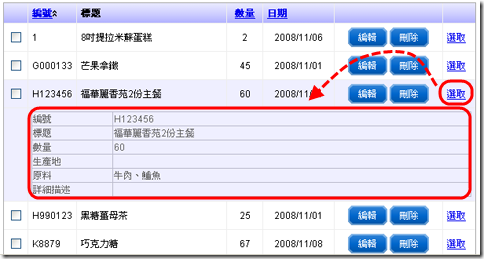
以下是SelectedIndexChanging內的程式碼:
    {
        this.getData(this.SortExpression, this.SortDirection);

        GridView1.Rows[e.NewSelectedIndex].Style["background-color"] = "#EFEFFF";
        GridView1.Rows[e.NewSelectedIndex].Attributes["onmouseover"] = "";
        GridView1.Rows[e.NewSelectedIndex].Attributes["onmouseout"] = "";


        GridViewRow row2 = new GridViewRow(e.NewSelectedIndex + 2, -1,
                DataControlRowType.DataRow, DataControlRowState.Normal);
        row2.Style["background-color"] = "#EFEFFF";


        TableCell cell0 = new TableCell();
        cell0.Text = "";

        TableCell cell1 = new TableCell();
        cell1.ColumnSpan = GridView1.Columns.Count-1;
        cell1.Style["color"] = "#666";

        string id = GridView1.DataKeys[e.NewSelectedIndex].Value.ToString();

        DataTable aTb = WebUtility.GetSQLdata(string.Format("select id as 編號,title as 標題, num as 數量, area as 生產地, meterial as 原料, description as 詳細描述 from product where id='{0}';", id), "teachDB");

        DetailsView aDv = new DetailsView();
        aDv.DataSource = aTb;
        aDv.DataBind();
        aDv.Style["border"] = "solid 1px #BBBBCC;";
        aDv.Width = Unit.Percentage(100);
        aDv.Rows[0].Cells[0].Style["width"] = "100px";

        cell1.Controls.Add(aDv);
        row2.Controls.Add(cell0);
        row2.Controls.Add(cell1);

        GridView1.Controls[0].Controls.AddAt(e.NewSelectedIndex + 2, row2);

    }