摘要:System.Transactions.TransactionScope 實作(確保交易的完整性)
前幾天因煩惱如何將2段底層元件的SQL動作包覆成一段完整的交易,無意間發現 topcat大大的文章(請參考確保交易的新利器(TransactionScope)初體驗-Part 1 與 確保交易的新利器(TransactionScope)初體驗-Part 2),於是便迫不及待的依照文章內容將TransactionScope加入程式中,以下介紹相關操作方式。
【一】加入System.Transactions參考
於專案中加入參考,選擇[.NET]頁籤,往下拖拉便可以看到System.Transactions如下圖: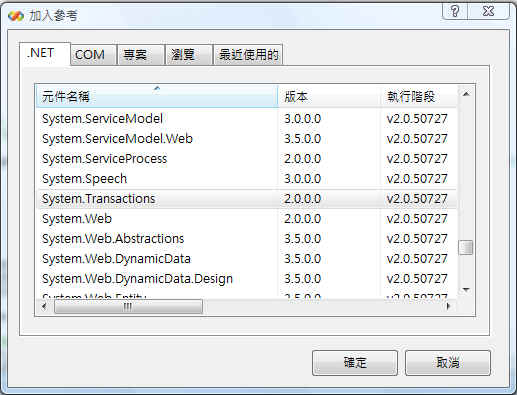
【二】開啟MSDTC的服務
從[控制台]→[系統管理工具]→ 開啟[服務],可以看到有個【Distributed Transaction Coordinator】服務把它啟動
(PS:如果不啟動,程式執行時會發生【伺服器...上的MSDTC無法使用...】的訊息)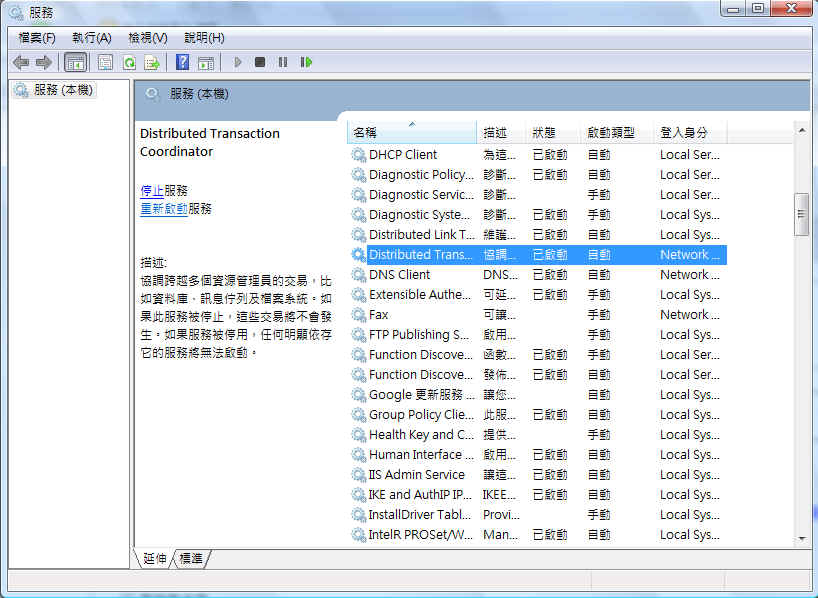
【三】於程式碼中加入TransactionScope
(PS:以下程式碼只有說明TransactionScope實作位置,請依照個別狀況做適當修改)
public void CommitSave()

 {
{
 UserInf usr = UserInf.GetUser(this.Page);
bool bFailed = false;
/*
* 運作過程中發生了【伺服器...上的MSDTC無法使用...】的訊息,代表主機上的MSDTC的服務沒有開啟
* 到【服務】裡面找到【Distributed Transaction Coordinator】將之啟動,即可啟動MSDTC
*/
 using (System.Transactions.TransactionScope scope = new System.Transactions.TransactionScope(System.Transactions.TransactionScopeOption.Required)) //利用using將程式碼包覆
{
try
{
//主檔
this.wucToolBarMasterX1.SaveRow();
//身檔
DUpdSql = GetDUpdSql(this.txtM02401f.Text, usr.Compid);
this.WucToolBarDetailD1.SaveRow(DUpdSql[0]);
this.WucToolBarDetailD2.SaveRow(DUpdSql[1]);
if (this.wucToolBarMasterX1.ToolBarState == wuc_public_wucToolBarMasterX.StateType.Add)
{
this.wucToolBarMasterX1.Insertevent();
 }
}
else if (this.wucToolBarMasterX1.ToolBarState == wuc_public_wucToolBarMasterX.StateType.Edit)
{
CustomMessage.focusAjax(this.Page, txtM02402f.ClientID);
}
scope.Complete(); //於正常執行後下達Complete指令
this.UpTab1.Update();
this.UpTab2.Update();
}
catch (Exception ex)
{
bFailed = true;
string ErrString = IscomComm.TextTrans("發生錯誤,停止儲存動作!\\n\\n") + IscomComm.chkErrType(ex.Message);
CustomMessage.showMsgByAjax(this.Page, ErrString);
}
}
if (bFailed)
{
if (this.wucToolBarMasterX1.ToolBarState == wuc_public_wucToolBarMasterX.StateType.Edit)
{
DSelSql = GetDSelSql(this.txtM02401f.Text, usr.Compid);
this.WucToolBarDetailD1.ToolBarDetailBind(DSelSql[0]);
this.WucToolBarDetailD2.ToolBarDetailBind(DSelSql[1]);
this.UpdatePanel2.Update();
this.wucToolBarMasterX1.ToolBarBind(this.InitSql());
DataRow dr = this.wucToolBarMasterX1.M_DataSet.Tables[0].Select("1=1 and M02401f='" + this.txtM02401f.Text + "' and compid='" + usr.Compid + "'")[0];
IscomComm.BindControl(placeEdit, dr);
}
}
}
 public void CommitSave()
  { UserInf usr = UserInf.GetUser(this.Page); bool bFailed = false; /* * 運作過程中發生了【伺服器...上的MSDTC無法使用...】的訊息,代表主機上的MSDTC的服務沒有開啟 * 到【服務】裡面找到【Distributed Transaction Coordinator】將之啟動,即可啟動MSDTC */ using (System.Transactions.TransactionScope scope = new System.Transactions.TransactionScope(System.Transactions.TransactionScopeOption.Required)) //利用using將程式碼包覆 { try { //主檔 this.wucToolBarMasterX1.SaveRow(); //身檔 DUpdSql = GetDUpdSql(this.txtM02401f.Text, usr.Compid); this.WucToolBarDetailD1.SaveRow(DUpdSql[0]); this.WucToolBarDetailD2.SaveRow(DUpdSql[1]); if (this.wucToolBarMasterX1.ToolBarState == wuc_public_wucToolBarMasterX.StateType.Add) { this.wucToolBarMasterX1.Insertevent(); } else if (this.wucToolBarMasterX1.ToolBarState == wuc_public_wucToolBarMasterX.StateType.Edit) { CustomMessage.focusAjax(this.Page, txtM02402f.ClientID); } scope.Complete(); //於正常執行後下達Complete指令 this.UpTab1.Update(); this.UpTab2.Update(); } catch (Exception ex) { bFailed = true; string ErrString = IscomComm.TextTrans("發生錯誤,停止儲存動作!\\n\\n") + IscomComm.chkErrType(ex.Message); CustomMessage.showMsgByAjax(this.Page, ErrString); } } if (bFailed) { if (this.wucToolBarMasterX1.ToolBarState == wuc_public_wucToolBarMasterX.StateType.Edit) { DSelSql = GetDSelSql(this.txtM02401f.Text, usr.Compid); this.WucToolBarDetailD1.ToolBarDetailBind(DSelSql[0]); this.WucToolBarDetailD2.ToolBarDetailBind(DSelSql[1]); this.UpdatePanel2.Update(); this.wucToolBarMasterX1.ToolBarBind(this.InitSql()); DataRow dr = this.wucToolBarMasterX1.M_DataSet.Tables[0].Select("1=1 and M02401f='" + this.txtM02401f.Text + "' and compid='" + usr.Compid + "'")[0]; IscomComm.BindControl(placeEdit, dr); } } }
最重要的是當SQL正常執行後,要告知TransactionScope已經完成(執行scope.Complete();),否則TransactionScope會認為未完成,會將所有動作回復。而當程式發生問題時便會直接跳到catch內而不會執行complete,自動rollback所有動作。
傑克,真是太神奇了阿