在Vue3專案裡使用Vue Flow套件之範例
因專案需求而研究Vue Flow套件,將基本的介紹作筆記。
首先開新Vue3專案,在終端機輸入安裝
npm add @vue-flow/core index.css
/* import the required styles */
@import '@vue-flow/core/dist/style.css';

/* import the default theme (optional) */
@import '@vue-flow/core/dist/theme-default.css';

html,
body,
#app {
  margin: 0;
  height: 100%;
}
main.js
import { createApp } from 'vue';
import ElementPlus from 'element-plus';
import 'element-plus/dist/index.css';
import './assets/index.css';
import './assets/dragDropEx.css';
import App from './App.vue';

const app = createApp(App);
app.use(ElementPlus);
app.mount('#app');引用VueFlow與資料屬性之範例1:
•nodes:節點
•edges:邊,也叫連接線
<script setup>
import { ref } from 'vue'
import { VueFlow } from '@vue-flow/core'

const nodes = ref([
  {
    id: '1',
    type: 'input',
    position: { x: 100, y: 100 },
    data: { label: '煮珍珠(工序 A)' },
  },

  {
    id: '2',
    position: { x: 100, y: 200 },
    data: { label: '泡茶(工序 B)' },
  },

  {
    id: '3',
    position: { x: 100, y: 300 },
    data: { label: '加料混合(工序 C)' },
  },

  {
    id: '4',
     type: 'output',
    position: { x: 100, y: 400 },
    data: { label: '封口 & 包裝(工序 D)' },
  },
])

const edges = ref([
    {
        id: 'e1->2',
        source: '1',
        target: '2',
        type: 'straight'
    },
    {
        id: 'e2->3',
        source: '2',
        target: '3',
        type: 'straight'
    },
    {
        id: 'e3->4',
        source: '3',
        target: '4',
    }
])
</script>

<template>
  <VueFlow :nodes="nodes" :edges="edges">
  </VueFlow>
</template>

<style>

</style>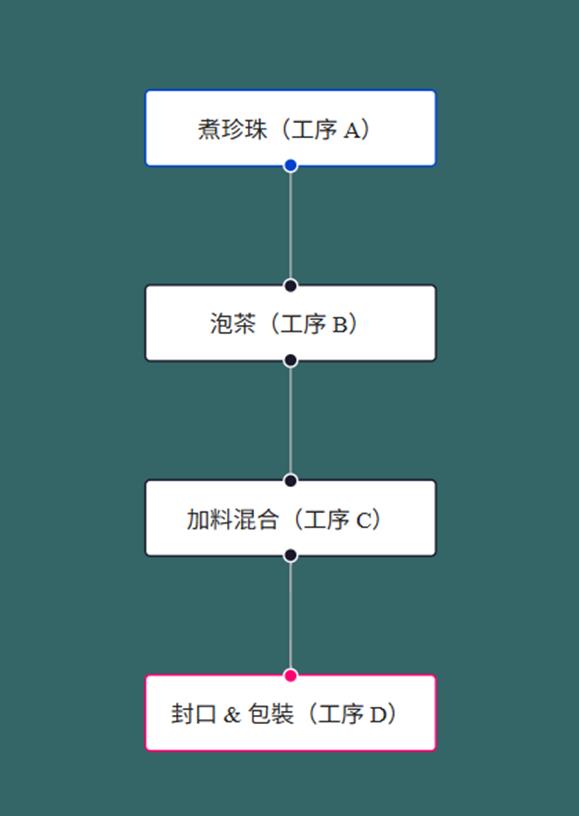
折線範例:edges 裡 type: 'step'
<script setup>
import { ref } from 'vue'
import { VueFlow } from '@vue-flow/core'

const nodes = ref([
    {
        id: '1',
        type: 'input',
        position: { x: 100, y: 100 },
        data: { label: '煮珍珠(工序 A)' },
    },

    {
        id: '2',
        position: { x: 200, y: 200 },
        data: { label: '泡茶(工序 B)' },
    },

    {
        id: '3',
        position: { x: 300, y: 300 },
        data: { label: '加料混合(工序 C)' },
    },

    {
        id: '4',
        type: 'output',
        position: { x: 400, y: 400 },
        data: { label: '封口 & 包裝(工序 D)' },
    },
])

const edges = ref([
    {
        id: 'e1->2',
        source: '1',
        target: '2',
        type: 'step'
    },
    {
        id: 'e2->3',
        source: '2',
        target: '3',
        type: 'step'
    },
    {
        id: 'e3->4',
        source: '3',
        target: '4',
        type: 'step'
    }
])
</script>

<template>
    <VueFlow :nodes="nodes" :edges="edges">
    </VueFlow>
</template>

<style></style>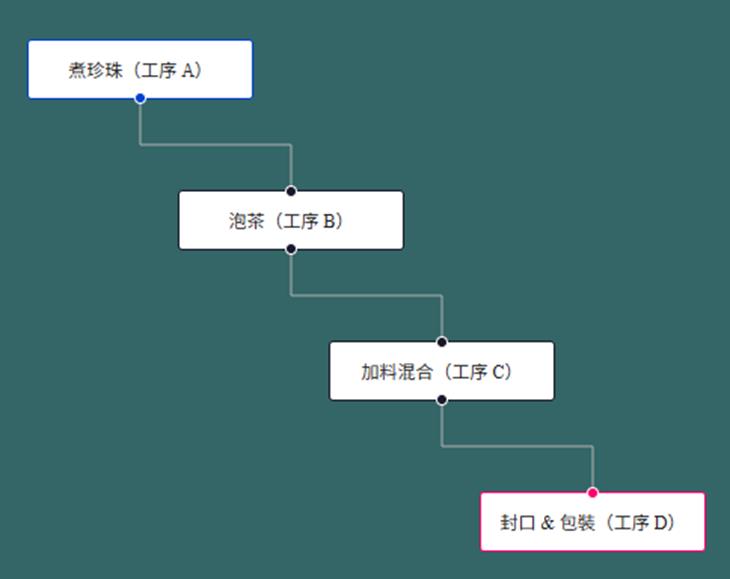
串連連接線範例:
const edges = ref([

])

const { onConnect, addEdges } = useVueFlow()
onConnect(({ source, target, sourceHandle, targetHandle }) => {
    console.log('source', source)
    console.log('target', target)
    console.log('sourceHandle', sourceHandle)
    console.log('targetHandle', targetHandle)
    addEdges({ source, target, sourceHandle, targetHandle })

    const timeStr = `${new Date().getMinutes()}-${new Date().getSeconds()}`
    edges.value.push({
        id: timeStr,
        source: source,
        target: target,
    })
})
客製化連接線(刪除圖示)範例:
CustomEdge.vue
<script setup>
import { computed } from 'vue'
import { BaseEdge, EdgeLabelRenderer, getBezierPath, useVueFlow } from '@vue-flow/core'

const props = defineProps({
  id: {
    type: String,
    required: true,
  },
  sourceX: {
    type: Number,
    required: true,
  },
  sourceY: {
    type: Number,
    required: true,
  },
  targetX: {
    type: Number,
    required: true,
  },
  targetY: {
    type: Number,
    required: true,
  },
  sourcePosition: {
    type: String,
    required: true,
  },
  targetPosition: {
    type: String,
    required: true,
  },
  data: {
    type: Object,
    required: false,
  },
  markerEnd: {
    type: String,
    required: false,
  },
  style: {
    type: Object,
    required: false,
  },
  deleteFunction:Function
})

// const { removeEdges } = useVueFlow()

const path = computed(() => getBezierPath(props))

</script>

<script>
export default {
  inheritAttrs: false,
}
</script>

<template>
  <BaseEdge :path="path[0]" />

  <EdgeLabelRenderer>
    <div
      :style="{
        pointerEvents: 'all',
        position: 'absolute',
        transform: `translate(-50%, -50%) translate(${path[1]}px,${path[2]}px)`,
      }"
      class="nodrag nopan"
    >
      <button class="edgebutton" @click="deleteFunction(id)">×</button>
    </div>
  </EdgeLabelRenderer>
</template>

<style>
.edgebutton {
  border-radius: 999px;
  cursor: pointer;
}

.edgebutton:hover {
  box-shadow: 0 0 0 2px pink, 0 0 0 4px #f05f75;
}
</style>
Ex5.vue
<script setup>
import { ref } from 'vue'
import { VueFlow, useVueFlow } from '@vue-flow/core'
import CustomEdge from "../components/CustomEdge.vue";

const nodes = ref([
    {
        id: '1',
        type: 'input',
        position: { x: 100, y: 100 },
        data: { label: '煮珍珠(工序 A)' },
    },

    {
        id: '2',
        position: { x: 200, y: 200 },
        data: { label: '泡茶(工序 B)' },
    },

    {
        id: '3',
        position: { x: 300, y: 300 },
        data: { label: '加料混合(工序 C)' },
    },

    {
        id: '4',
        type: 'output',
        position: { x: 400, y: 400 },
        data: { label: '封口 & 包裝(工序 D)' },
    },
])

const edges = ref([
    {
        id: 'e1->2',
        source: '1',
        target: '2',
        type: "custom"
    },
    {
        id: 'e2->3',
        source: '2',
        target: '3',
        type: "custom"
    },
    {
        id: 'e3->4',
        source: '3',
        target: '4',
        type: "custom"
    }
])

const { onConnect, addEdges, removeEdges } = useVueFlow()
onConnect(({ source, target, sourceHandle, targetHandle }) => {
    console.log('source', source)
    console.log('target', target)
    console.log('sourceHandle', sourceHandle)
    console.log('targetHandle', targetHandle)
    // addEdges({ source, target, sourceHandle, targetHandle })

    const timeStr = `${new Date().getMinutes()}-${new Date().getSeconds()}`

    addEdges([
        {
            id: timeStr, // 可選,若未指定會自動生成
            source: source,
            target: target,
            sourceHandle: sourceHandle,
            targetHandle: targetHandle,
            type: 'custom', // 指定自訂類型
        },
    ])

    edges.value.push({
        id: timeStr,
        source: source,
        target: target,
        type: "custom"
    })
})

/**
 * 刪除邊
 * @param id
 */
function deleteEdge(id) {
    console.log('deleteEdge id', id)
    removeEdges(id)
    edges.value = edges.value.filter(x => x.id != id)
}
</script>

<template>
    <VueFlow :nodes="nodes" :edges="edges">
        <template #edge-custom="edgeProps">
            <CustomEdge v-bind="edgeProps" :deleteFunction="deleteEdge" />
        </template>
    </VueFlow>
</template>

<style></style>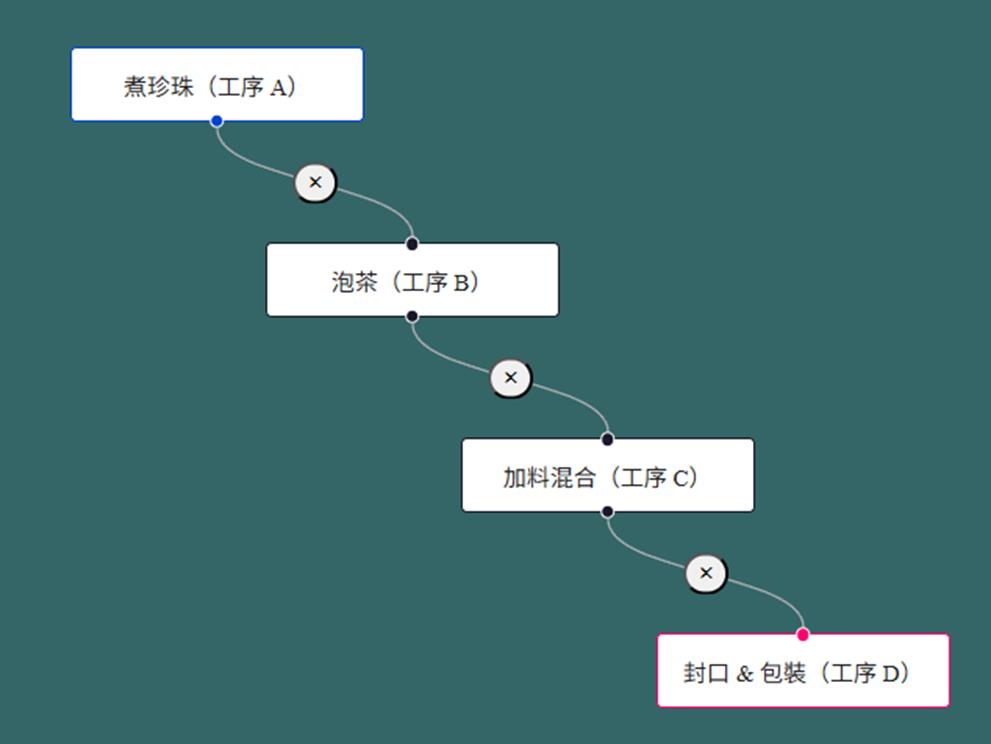
連接線動畫範例:edges內animated: true
const edges = ref([
    {
        id: 'e1->2',
        source: '1',
        target: '2',
        animated: true
    },
    {
        id: 'e2->3',
        source: '2',
        target: '3',
        animated: true
    },
    {
        id: 'e3->4',
        source: '3',
        target: '4',
        animated: true
    }
])
以上是摘錄部份sourcecode的範例之筆記。