摘要:依表單欄位自動產生DataColumn.
依表單欄位自動產生DataColumn 
如下圖所示,將某表單裡的所有 TextBox 控制項,載入 DataColumns 集合 中,讓 TextBox 的名稱或資料等訊息,得以自由操控。而且是在不建立 Connection、Command等 ADO.NET 控件的情況下,獲取資料。
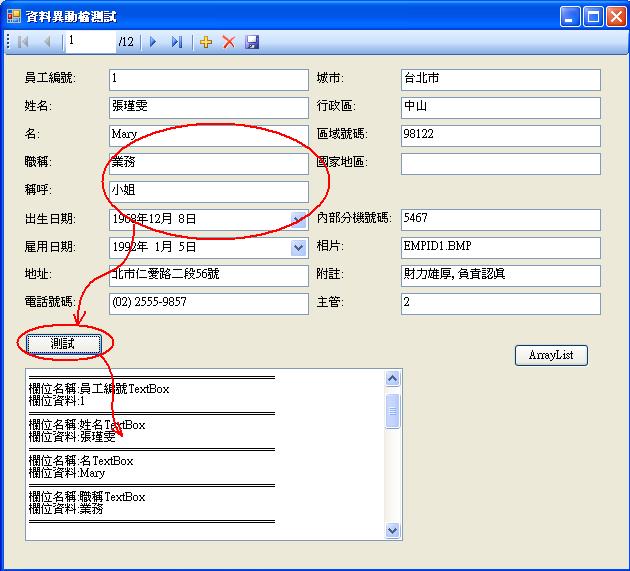
Code :
Imports System.Text
Public Class ChgData
......(略)
Private Sub Button2_Click(ByVal sender As System.Object, ByVal e As System.EventArgs) Handles Button2.Click
Dim c As Control
Dim ArryColumn As ArrayList = New ArrayList()
Dim ArryRow As ArrayList = New ArrayList()
Dim sb As New StringBuilder
' 建立 DataTable 和 DataRow.
Dim myTable As New DataTable("記錄檔")
Dim row As DataRow = myTable.NewRow()
'取得表單中所有 Textbox 的名稱和資料 ,分別並寫入到兩個 ArrayList 中.
For Each c In Me.Controls
If TypeOf c Is TextBox Then
ArryColumn.Add(c.Name) 'TextBox名稱.
ArryRow.Add(c.Text) 'TextBox資料.
End If
Next
'動態產生 DataColumn 欄位 ,並加到欄位集合中.
For i As Integer = 0 To ArryColumn.Count - 1
myTable.Columns.Add(New DataColumn(ArryColumn.Item(i),_
System.Type.GetType("System.String")))
row(i) = ArryRow.Item(i)
sb.AppendLine("欄位名稱:" & myTable.Columns(i).ColumnName)
sb.AppendLine("欄位資料:" & row(i))
sb.AppendLine("=========================================")
Next
'將結果寫入TextBox1中.
TextBox1.Multiline = True
TextBox1.ScrollBars = ScrollBars.Both
TextBox1.Text = sb.ToString
End Sub
End Class
凡事,總有更輕鬆的解決方法。