不同Framework同步Session資料
問題的起源:在IIS6中,同一個Site下面有兩個應用程式目錄,分別使用 NET1.1 和 NET2.0,登入頁面在 1.1,登入後使用者資料會只會寫到 1.1 的 Session(廢話 XD)。登入後頁面上有樹狀目錄,當使用者點選某些連結,會跳到 2.0 的頁面,但是2.0 的頁面必須透過使用者的登入資訊,檢核是否有登入及有無此頁面的 Function ID。
另外,Session Timeout 時間由 1.1 決定。當 2.0 Session Timeout 時,1.1 若尚未 Timeout,則必須從 1.1 再把 Session 資訊同步過來。
研究好久,總算解了這個問題,筆記如下:
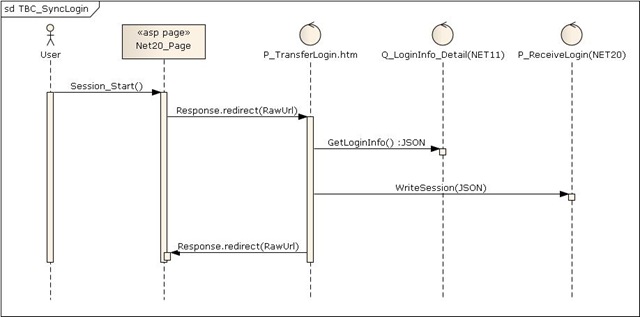
- 使用到的第三方程式:jQuery、JSON.NET(System.Net.Json)
- NET2.0的Global.asax.vb中,撰寫如下程式碼:
        Response.Redirect("/SyncLoginInfo/P_TransferLogin.htm?url=" & Server.UrlEncode(Request.RawUrl))
    End Sub
主要就是當Session啟動時,把目前連結的網址以參數方式,傳給一個靜態頁面,準備同步Session資料。 - 開一個SyncLoginInfo的NET1.1專案,裡面包含以下兩隻檔案:
P_TransferLogin.htm:核心檔案!ajax到Q_LoginInfo_Detail.aspx取得Session的JSON字串,再把JSON字串丟到NET2.0的頁面(/Login/P_ReceiveLogin.aspx)寫入2.0的Session,最後再導回到原始連結的2.0頁面。
	<script src="../js/jquery.query.js" type="text/javascript"></script>
    <script language="javascript" type="text/javascript">
        $(document).ready(function() {
            $.ajax({
                type: "post",
                cache: false,
                url: 'Q_LoginInfo_Detail.aspx', //To Server
                data: {},
                error: function() {
                },
                success: function(response) {
					$("#txtLogin").val(response);
					$.ajax({
						type: "post",
						cache: false,
						url: '/Login/P_ReceiveLogin.aspx', //To Server
						data: {info: response},
						error: function() {
							alert("無法同步登入資訊。");
						},
						success: function(response) {
							window.location = $.query.get("url");
						}
					});
                }
            });
        });
    </script>
Q_LoginInfo_Detail.aspx.vb:將Session中的資料組成JSON字串。
Dim nvcLogin As New System.Collections.Specialized.NameValueCollection Dim sbValue As New System.Text.StringBuilder Dim iKeys As Integer = Me.Session.Keys.Count Dim sKey, sValue, sJSON As String For i As Integer = 0 To iKeys - 1 sKey = Me.Session.Keys.Item(i) sValue = Me.Session(sKey).ToString If sValue.IndexOf("""") > -1 Then sValue = sValue.Replace("""", "\""") End If If i > 0 Then sbValue.Append(",") End If sbValue.Append("""" & sKey & """:""" & sValue & """") Next sJSON = "{" & sbValue.ToString & "}" Response.Write(sJSON) End Sub - /Login/P_ReceiveLogin.aspx.vb (NET2.0專案)
        If Not IsNothing(Request("info")) AndAlso Request("info").Length > 7 Then
            Dim jspPaser As New JsonTextParser
            Dim jsoLogin As JsonObject = jspPaser.Parse(Request("info"))
            For Each jso As JsonObject In CType(jsoLogin, JsonCollection)
                Session.Add(jso.Name, jso.GetValue().ToString)
            Next
        End If

    End Sub
這裡使用System.Net.Json,加速開發。
接下來還有一個問題:
若已經換人登入(例如:第一次登入 User_A,然後點選了 2.0 的頁面,後來又登出,重新登入為 User_B),則必須把 2.0 的 Session 更新為目前登入的人員。
下一篇再分享。
--------
沒什麼特別的~
不過是一些筆記而已