製作 CKEdiotr 的 Server Control
今天把 CKEditor 做成 Server Control,雖然有點畫蛇添足,因為要用使用CKEditor並不麻煩,做完後感覺好像載入的反應有慢一點點耶……會是我的錯覺嗎?
先來看看要怎樣才能再 ASP.NET 中使用 CKEditor ,我的 Sample 是直接使用 textarea 標籤,也可以使用C# <asp:TextBox> 將 TextMode設定成 MultiLine。
- 到 CKEditor 官方網站下載 CKEditor
- 使用建立一個網站
- 將下載下來的 CKEditor 壓縮檔,解壓縮到網站目錄
- 修改 Default.aspx 內容,增加下面二項內容:
Head區段加入
<script type="text/javascript" src="/ckeditor/ckeditor.js"></script>
Form1裡面加入一個Textarea
<textarea id="editor1" name="editor1" rows="10" cols="80"></textarea>
<script type="text/javascript">
var editor = (typeof CKEDITOR == 'undefined' ? null : CKEDITOR.replace('editor1'));
</script>
Default.aspx 完整內容如下:
<%@ Page Language="C#" AutoEventWireup="true" CodeBehind="Default.aspx.cs" Inherits="WebDemo.Default" %> <!DOCTYPE html PUBLIC "-//W3C//DTD XHTML 1.0 Transitional//EN" "http://www.w3.org/TR/xhtml1/DTD/xhtml1-transitional.dtd"> <html xmlns="http://www.w3.org/1999/xhtml" > <head runat="server"> <title></title> <script type="text/javascript" src="/ckeditor/ckeditor.js"></script> <script type="text/javascript" src="/ckfinder/ckfinder.js"></script> </head> <body> <form id="form1" runat="server"> <div> <textarea id="editor1" name="editor1" rows="10" cols="80"></textarea> <script type="text/javascript"> var editor = (typeof CKEDITOR == 'undefined' ? null : CKEDITOR.replace('editor1')); </script> </div> </form> </body> </html> - 執行後即可看到 textarea 套用 CKEditor 了
所以最基本的方式就是引用 ckeditor.js,加入一個 Textarea ,然後在網頁載入完成時將 textarea 套上 CKEditor 的功能。
因為看起來不難搞定,所以就來動手做個Server Control 吧!
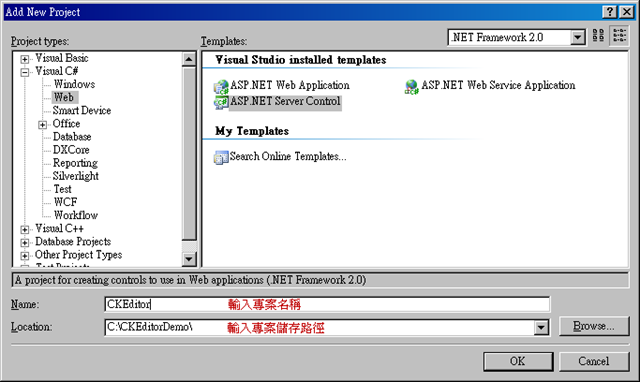
- 首先建立一個伺服器控制項專案
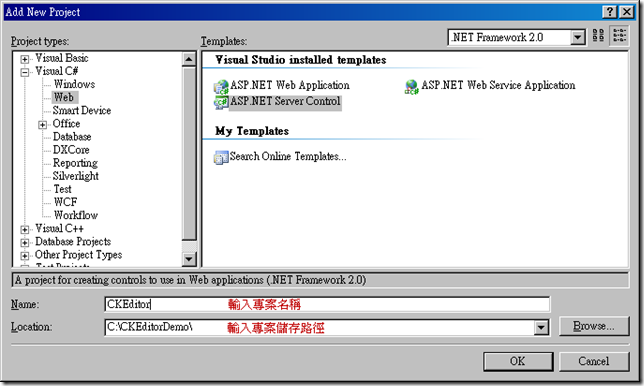
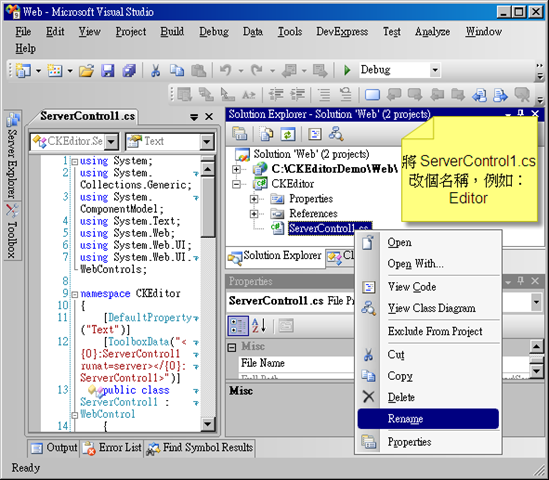
- 更改一下 ServerControl1.cs 檔案名稱,換成「Editor.cs」
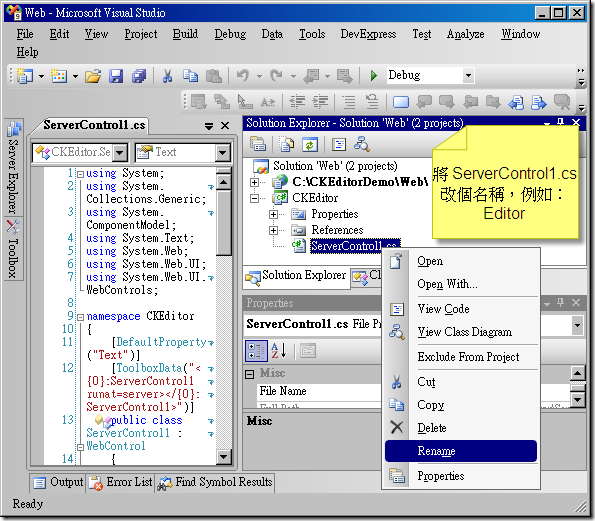
- 加入參考以下組件
System.Drawing
System.Design - Editor.cs 檔案內容換成下面程式
using System;
using System.ComponentModel;
using System.Text;
using System.Web;
using System.Web.UI;
using System.Web.UI.WebControls;
using System.Drawing;
using System.Drawing.Design;

namespace CKEditor
{

    [System.Security.Permissions.PermissionSet(System.Security.Permissions.SecurityAction.Demand, Name = "FullTrust")]
    [ParseChildren(true,"Text")]
    [DefaultProperty("Text")]
    [ToolboxData("<{0}:Editor runat=server></{0}:Editor>")]
    public class Editor : WebControl,IPostBackDataHandler
    {

        #region Properties

        [Bindable(true)]
        [Category("Appearance")]
        [DefaultValue("")]
        [Localizable(true)]
        [PersistenceMode(PersistenceMode.InnerDefaultProperty)]
        public string Text
        {
            get
            {
                String s = (String)ViewState["Text"];
                string value=((s == null) ? "[" + this.ID + "]" : s);
                return HttpUtility.HtmlDecode(value);
            }

            set
            {
                ViewState["Text"] = HttpUtility.HtmlEncode(value);
            }
        }


        [Bindable(true),
        Category("Appearance"),
        Description("CKEditor ScriptPath."),
        DefaultValue("~/ckeditor/cdeditor.js"),
        Localizable(false)]
        [Editor("System.Web.UI.Design.UrlEditor", typeof(UITypeEditor)), UrlProperty]
        public string CKEditorScriptPath
        {
            get
            {
                object o = ViewState["CKEditorScriptPath"];

                if (o == null)
                    o = System.Configuration.ConfigurationSettings.AppSettings["CKEditor:CKEditorScriptPath"];

                return (o == null ? "~/ckeditor/ckeditor.js" : (string)o);
            }
            set { ViewState["CKEditorScriptPath"] = value; }
        }

        [Category("Appearence")]
        [DefaultValue("10")]
        public int Rows
        {
            get { object o = ViewState["Rows"]; return (o == null ? (int)10 : (int)o); }
            set { ViewState["Rows"] = value; }
        }

        [Category("Appearence")]
        [DefaultValue("80")]
        public int Cols
        {
            get { object o = ViewState["Cols"]; return (o == null ? (int)80 : (int)o); }
            set { ViewState["Cols"] = value; }
        }

        [DefaultValue("")]
        public string ClassName
        {
            get { return ViewState["ClassName"] as string; }
            set { ViewState["ClassName"] = value; }
        }

        [TypeConverter(typeof(WebColorConverter))]
        [DefaultValue("#CCCCCC")]
        public Color UIColor
        {
            get { object o = ViewState["UIColor"]; return (o == null ? Color.LightGray : (Color)o); }
            set { ViewState["UIColor"] = value; }
        }

        [Category("CKEdiotr")]
        [DefaultValue("")]
        public string ToolBar
        {
            get { object o = ViewState["ToolBar"]; return (o == null ? "" : (string)o); }
            set { ViewState["ToolBar"] = value; }
        }

        //[DefaultValue("v2")]
        //public SkinType Skin
        //{
        //    get { object o = ViewState["Skin"]; return (o == null ? SkinType.v2 : (SkinType)o); }
        //    set { ViewState["Skin"] = value; }
        //}

        [Category("CKEdiotr")]
        [DefaultValue(false)]
        public bool Disabled
        {
            get { object o = ViewState["Disabled"]; return (o == null ? false : (bool)o); }
            set { ViewState["Disabled"] = value; }
        }

        [Category("CKFinder")]
        [DefaultValue(false)]
        public bool CKFinderEnable
        {
            get { object o = ViewState["CKFinderEnable"]; return (o == null ? false : (bool)o); }
            set { ViewState["CKFinderEnable"] = value; }
        }

        [Bindable(true)]
        [Category("CKFinder")]
        [DefaultValue("~/ckfinder/ckfinder.js")]
        [Editor("System.Web.UI.Design.UrlEditor", typeof(UITypeEditor)), UrlProperty]

        public string CKFinderScriptPath
        {
            get
            {
                object o = ViewState["CKFinderScriptPath"];

                if (o == null)
                    o = System.Configuration.ConfigurationSettings.AppSettings["CKFinder:ScriptPath"];

                return (o == null ? "~/ckfinder/ckfinder.js" : (string)o);
            }
            set { ViewState["CKFinderScriptPath"] = value; }
        }


        private string GetFolderName(string urlPath)
        {
            return urlPath.Substring(0,urlPath.LastIndexOf('/'));
        }


        public string CreateHtml()
        {

            System.Text.StringBuilder initScript = new StringBuilder();
            initScript.AppendLine("<script type=\"text/javascript\">");
            initScript.AppendLine("//<![CDATA[");
            initScript.AppendLine("var editor" + this.UniqueID + " = CKEDITOR.replace( '" + this.UniqueID + "',");
            initScript.AppendLine("{");
            //initScript.AppendLine("skin : '" + this.Skin.ToString() + "'");//v2, office2003 , kama
            initScript.AppendLine("uiColor: '" + ColorTranslator.ToHtml(this.UIColor) + "'");
            initScript.AppendLine(",enterMode : Number( 2)");
            initScript.AppendLine(",shiftEnterMode : Number( 1)");
            if (this.ToolBar.Length > 0)
            {
                initScript.AppendLine(",toolbar_TadToolbar :" + this.ToolBar);
            }
            initScript.AppendLine("}");
            initScript.AppendLine(");");
            if (this.CKFinderEnable)
            {
                initScript.AppendLine("CKFinder.SetupCKEditor(editor" + this.UniqueID + ", '" + this.Page.ResolveUrl(GetFolderName((this.CKFinderScriptPath))) + "');");
            }

            initScript.AppendLine("//]]>");
            initScript.AppendLine("</script>");

            return initScript.ToString();
        }

        #endregion

        protected override void OnPreRender(EventArgs e)
        {


            ClientScriptManager cs = this.Page.ClientScript;

            if (!cs.IsClientScriptBlockRegistered(typeof(Page), "ckeditorScript"))
            {
                cs.RegisterClientScriptBlock(typeof(Page), "ckeditorScript",
                    "<script type='text/javascript' src='" + this.Page.ResolveUrl(this.CKEditorScriptPath) + "'></script>");
            }
            if (!cs.IsClientScriptBlockRegistered(typeof(Page), "ckfinderScript"))
            {
                cs.RegisterClientScriptBlock(typeof(Page), "ckfinderScript",
                    "<script type='text/javascript' src='" + this.Page.ResolveUrl(this.CKFinderScriptPath) + "'></script>");
            }

            base.OnPreRender(e);
        }

        protected override void Render(HtmlTextWriter writer)
        {
            string _ClassName = this.ClassName;

            if (_ClassName != null && _ClassName.Length > 0)
                _ClassName = " class=\"" + _ClassName + "\"";

            //base.Render(writer);
            writer.Write(string.Format("<textarea id='{0}' name='{0}'{1} >{2}</textarea>", this.UniqueID, _ClassName ,this.Text));

            writer.Write(this.CreateHtml());

        }


        #region For postback

        public event EventHandler TextChanged;


        public virtual bool LoadPostData(string postDataKey,
           System.Collections.Specialized.NameValueCollection postCollection)
        {

            String presentValue = Text;
            String postedValue = postCollection[postDataKey];

            if (presentValue == null || !presentValue.Equals(postedValue))
            {
                //base.ValidateEvent(postDataKey);
                Text = postedValue;
                return true;
            }

            return false;
        }


        public virtual void RaisePostDataChangedEvent()
        {
            OnTextChanged(EventArgs.Empty);
        }


        protected virtual void OnTextChanged(EventArgs e)
        {
            if (TextChanged != null)
                TextChanged(this, e);
        }

        #endregion
    }
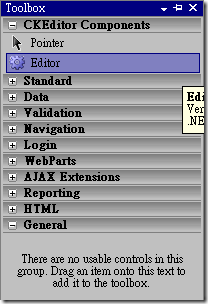
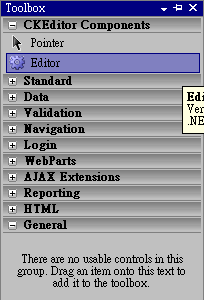
} - 在網站中,將這個專案加入參考,或是將專案編譯成 Dll 檔之後,將 CKEditor.dll 加入參考,就能在工具箱看到Editor控制項了!
- 使用時只要拖拉到網頁中,能使用了!
這個Server control 自己有些屬性已經加上去了,skin 屬性我是建立一個 enum skintype{v2,office2003,kama},應該要依skin目錄中的名稱列出選項,但是我沒想到設計階段要如何製作,所以先註解,如果有需要的人可以再花點時間加上ToolBar或是其它設定項目。
2009/12/27 補充:
在OnPreRender加入以下程式碼,可以不用將表單驗證關閉,我只有使用 IE 和 Firefox,所以不保證其它瀏覽器正常喔!
今天使用時發現上面的作法當文子框輸入含有單引號會出錯
-------
一點一滴堆砌著夢想的執行者