[C#.NET]使用.NET自製COM元件
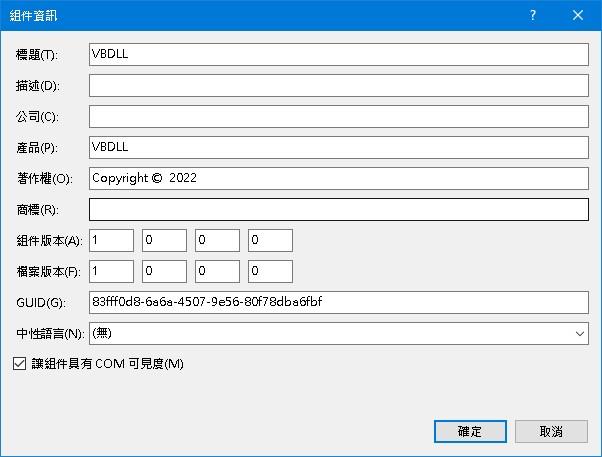
[讓組件具有COM可見度]--打勾
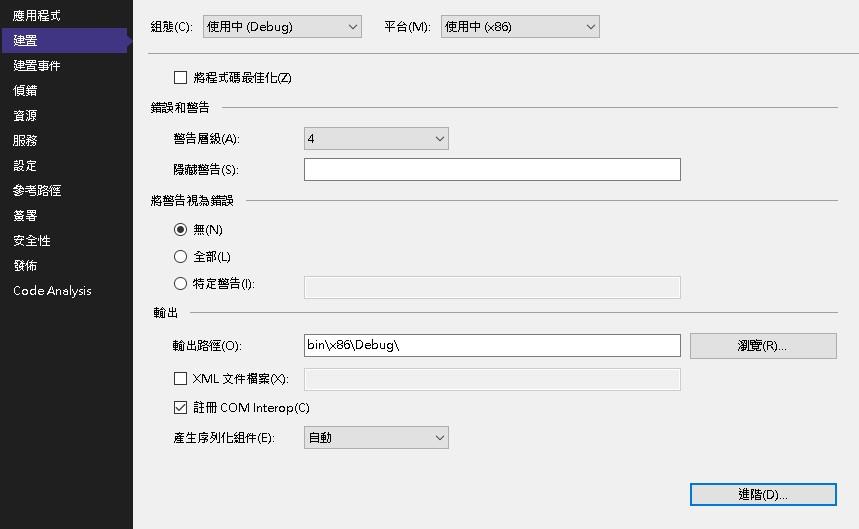
[註冊COM Interop]打勾
using System;
using System.Collections.Generic;
using System.Linq;
using System.Runtime.InteropServices;
using System.Text;
using System.Threading.Tasks;
using System.Windows.Forms;


namespace VBDLL
{

    public interface ICom
    {
        //不想讓其他看見設False 相當於Private
        [ComVisible(false)]
        double ComTestMethod(double radius, string comment);

        void useOpenTK();
        string getNow();
       Int16 MyProperty { get; set; }

    }

    //ClassInterfaceType.None
    //繼承介面開放 才看的到方法和屬性
    //ClassInterfaceType.AutoDual
    //所有的方法屬性自動做成介面開放
    [ClassInterface(ClassInterfaceType.None)]
    public class ClassCom : Form, ICom
    {
        public Int16 MyProperty { get; set ; }

        public double ComTestMethod(double radius, string comment)
        {
            MessageBox.Show(comment);
            return radius;
        }

        public string getNow()
        {
            return DateTime.Now.ToString();
        }


        //使用外部套件也可以
        public void useOpenTK()
        {

            OpenTK.GameWindow gameWindow = new OpenTK.GameWindow();
            gameWindow.Size = new System.Drawing.Size(100, 100);
            gameWindow.Run();
        }
    }
}
如果出現錯誤
1.編譯版本請確認X86或X64
2.使用RegAsm.exe註冊DLL
regasm vbdll.dll /c
直接使用會報錯RegAsm : error RA0000 : 由於這不是一個有效的 .NET 組件,所以無法載入
輸出reg檔案再匯入regasm vbdll.dll /c /regfile:vbdll.reg
3.注意regasm.exe版本 有分32位元x86 64位元x64