[C#.NET][Infopath 2010] 如何在 VSTA 引用欄位
Infopath 存放資料的欄位有兩種,一種是單一節點,另一種是重覆節點,本篇將介紹如此使用單一節點的基本操作。
Step 1.首先我們要先引用資料來源
1-1.資料來源是在主要資料(Main),引用方式:
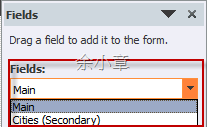
//引用 MainData 節點
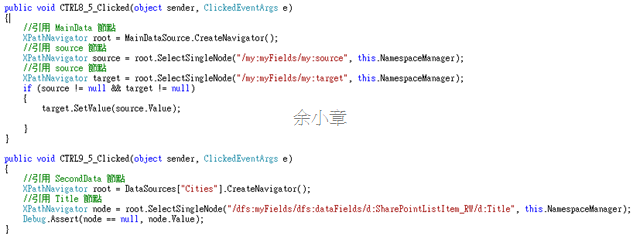
XPathNavigator root = MainDataSource.CreateNavigator();
1-2.若是次要資料庫(Secondary),除了主要資料庫外,凡連線到外部資料庫一律都叫Secondary,引用方式:
//引用 SecondData 節點
XPathNavigator root = DataSources["Cities"].CreateNavigator();
Step 2.引用欄位(主要、次要資料庫的方式都一樣)
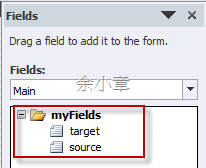
//引用 source 節點
XPathNavigator source = root.SelectSingleNode("/my:myFields/my:source", this.NamespaceManager); 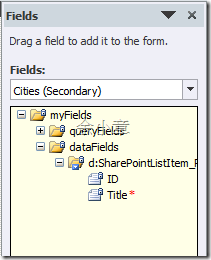
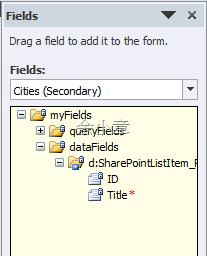
//引用 Title 節點
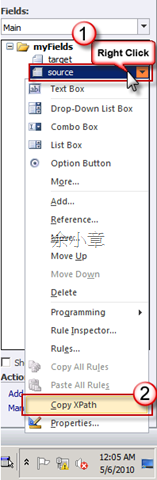
XPathNavigator node = root.SelectSingleNode("/dfs:myFields/dfs:dataFields/d:SharePointListItem_RW/d:Title", this.NamespaceManager); Note:當節點很長時,引用字串會越來越長("/my:myFields/my:source"),光打這個會起笑,提供個小方法
只要在欄位按右鍵,執行Copy XPath即可
測試程式碼如下
範例下載
參考資料
若有謬誤,煩請告知,新手發帖請多包涵

Microsoft MVP Award 2010~2017 C# 第四季
Microsoft MVP Award 2018~2025 .NET
