[C#.NET][WPF][Thread] 跨執行緒更新UI
這絕對是很常見的一個問題,不管是在Winform或是WPF,先來一段常會發生的錯誤碼,DoWork方法會呼叫updateControl()方法更新Label控制項,
private void button1_Click(object sender, RoutedEventArgs e)
{
    ThreadPool.QueueUserWorkItem(o =>
    {
        DoWork(this.label1);
    });
}
void DoWork(Label label)
{
    int result = 0;
    for (int i = 0; i < 9999999; i++)
    {
        result++;
        updateControl(label, result);
    }
}
void updateControl(Label Label, int Result)
{
    Label.Content = Result;
}<![CDATA[csharpcode, .csharpcode pre
{
	font-size: small;
	color: black;
	font-family: consolas, "Courier New", courier, monospace;
	background-color: #ffffff;
	/*white-space: pre;*/
}
.csharpcode pre { margin: 0em; }
.csharpcode .rem { color: #008000; }
.csharpcode .kwrd { color: #0000ff; }
.csharpcode .str { color: #006080; }
.csharpcode .op { color: #0000c0; }
.csharpcode .preproc { color: #cc6633; }
.csharpcode .asp { background-color: #ffff00; }
.csharpcode .html { color: #800000; }
.csharpcode .attr { color: #ff0000; }
.csharpcode .alt
{
	background-color: #f4f4f4;
	width: 100%;
	margin: 0em;
}
.csharpcode .lnum { color: #606060; }
]]>
因為使用執行緒,上面的寫法會跳出跨執行緒的例外。
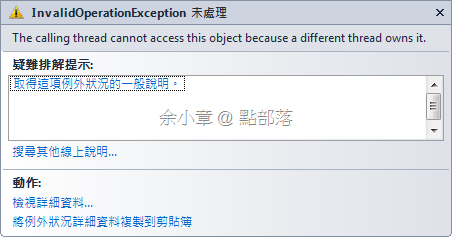
- 在Winform裡要處理跨執行緒更新UI的問題,可以使用this.Invoke或this.BeginInvoke,請參考[C#.NET] 如何 使用 多執行緒 Thread / 跨執行緒 存取UI,上篇使用了自定義的 delegate
- 而在WPF裡則是使用Dispatcher 類別,使用Dispatcher.CheckAccess()方法判斷是否需跨執行緒更新UI,用Dispatcher.Invoke或Dispatcher.BeginInvoke更新UI,在這裡我想使用Action
然後我將程式碼修改如下:
private void button1_Click(object sender, RoutedEventArgs e)
{
    ThreadPool.QueueUserWorkItem(o =>
    {
        DoWork(this.label1);
    });
}
void DoWork(Label label)
{
    int result = 0;

    for (int i = 0; i < 9999999; i++)
    {
        result++;
        if (!Dispatcher.CheckAccess())
        {
            Dispatcher.Invoke(DispatcherPriority.Normal, new Action<Label, int>(updateControl), label, result);
        }
        else
        {
            updateControl(label, result);
        }
        Thread.Sleep(1);
    }
}
void updateControl(Label Label, int Result)
{
    Label.Content = Result;
}<![CDATA[csharpcode, .csharpcode pre
{
	font-size: small;
	color: black;
	font-family: consolas, "Courier New", courier, monospace;
	background-color: #ffffff;
	/*white-space: pre;*/
}
.csharpcode pre { margin: 0em; }
.csharpcode .rem { color: #008000; }
.csharpcode .kwrd { color: #0000ff; }
.csharpcode .str { color: #006080; }
.csharpcode .op { color: #0000c0; }
.csharpcode .preproc { color: #cc6633; }
.csharpcode .asp { background-color: #ffff00; }
.csharpcode .html { color: #800000; }
.csharpcode .attr { color: #ff0000; }
.csharpcode .alt
{
	background-color: #f4f4f4;
	width: 100%;
	margin: 0em;
}
.csharpcode .lnum { color: #606060; }
]]>
當然這可以很順利的執行並且更新UI,然後我將上述的程式碼,將確定只會使用一次的方法利用lambda縮短成為以下
private void button1_Click(object sender, RoutedEventArgs e)
{
    ThreadPool.QueueUserWorkItem(o =>
    {
        int result = 0;
        for (int i = 0; i < 9999999; i++)
        {
            result++;
            Dispatcher.BeginInvoke(new Action(() =>
            {
                this.label1.Content = result;
            }));
            Thread.Sleep(1);
        }
    });
}<![CDATA[csharpcode, .csharpcode pre
{
	font-size: small;
	color: black;
	font-family: consolas, "Courier New", courier, monospace;
	background-color: #ffffff;
	/*white-space: pre;*/
}
.csharpcode pre { margin: 0em; }
.csharpcode .rem { color: #008000; }
.csharpcode .kwrd { color: #0000ff; }
.csharpcode .str { color: #006080; }
.csharpcode .op { color: #0000c0; }
.csharpcode .preproc { color: #cc6633; }
.csharpcode .asp { background-color: #ffff00; }
.csharpcode .html { color: #800000; }
.csharpcode .attr { color: #ff0000; }
.csharpcode .alt
{
	background-color: #f4f4f4;
	width: 100%;
	margin: 0em;
}
.csharpcode .lnum { color: #606060; }
]]>
若有謬誤,煩請告知,新手發帖請多包涵

Microsoft MVP Award 2010~2017 C# 第四季
Microsoft MVP Award 2018~2025 .NET
