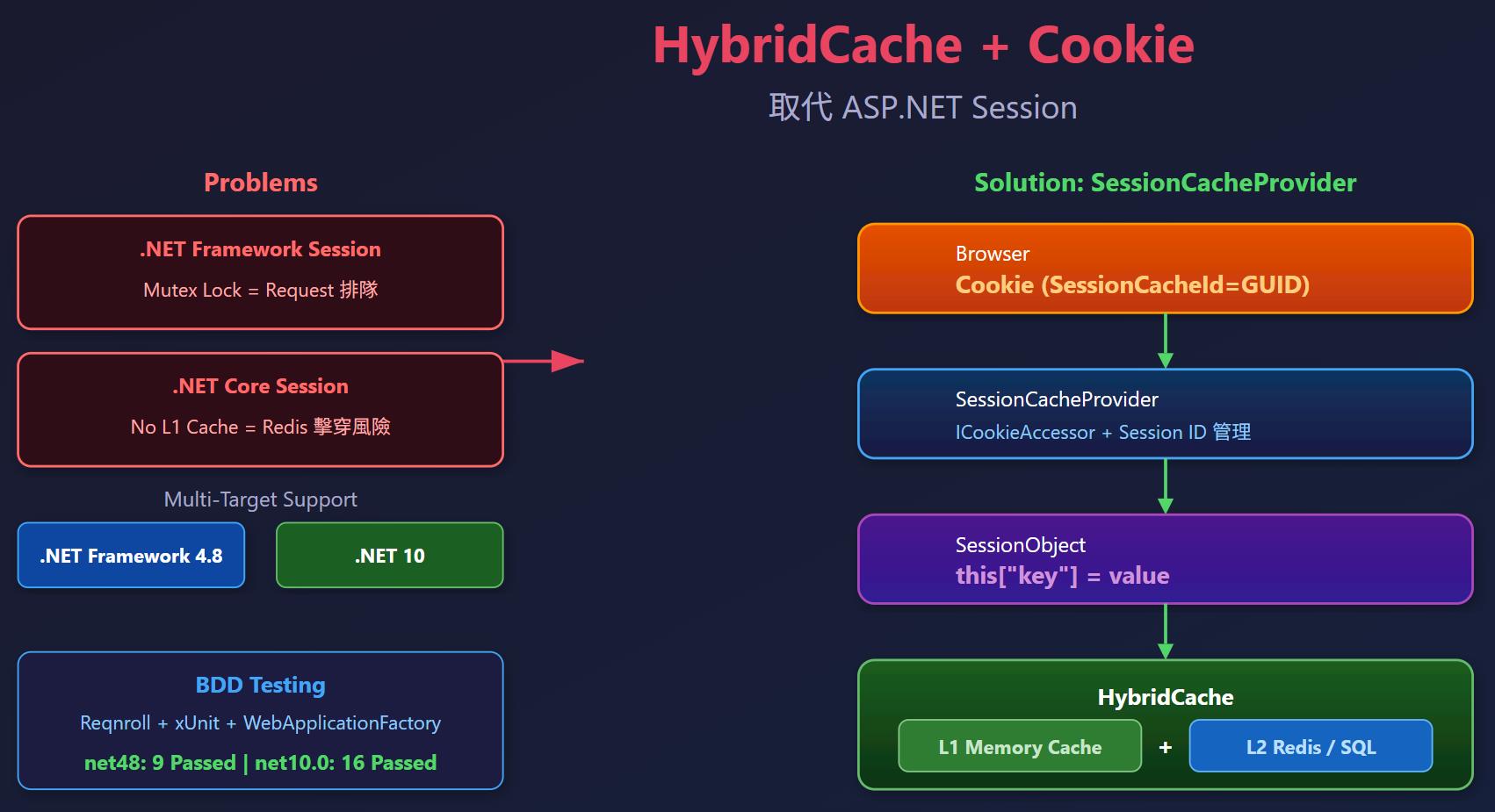
ASP.NET Framework 的 Session 預設使用排他鎖(Mutex),同一個使用者的 Request 會排隊等待,嚴重影響效能。而 ASP.NET Core 的 Session 雖然不會排隊,但底層是 IDistributedCache,不支援 HybridCache,每次存取都直接打 Redis,沒有 L1 記憶體快取,高流量時有快取擊穿的風險。
這篇想要演練的是用 HybridCache + Cookie 實作一個 SessionCacheProvider,讓開發者用起來跟原本的 Session["key"] 幾乎一樣,同時支援 ASP.NET Framework 4.8 和 ASP.NET Core (.NET 10)。
開發環境
- Windows 11
- .NET 10 / .NET Framework 4.8
- Microsoft.Extensions.Caching.Hybrid 10.4.0
- Reqnroll (BDD)
- xUnit
設計概念
核心想法很簡單:
- 用 Cookie 存 Session ID(一個 GUID)
- 用 HybridCache 存實際的 Session 資料,快取的 key 格式為
session:{sessionId}:{key} - HybridCache 提供 L1(記憶體)+ L2(Redis 等分散式快取) 雙層快取,解決快取擊穿問題
架構如下:
Browser Cookie (SessionCacheId=xxx)
        │
        ▼
SessionCacheProvider(管理 Session ID 的建立與取得)
        │
        ▼
SessionObject(提供 this["key"] 索引器存取)
        │
        ▼
HybridCache(L1 記憶體 + L2 分散式快取)
專案結構
Lab.SessionCacheProvider/
├── Lab.SessionCacheProvider/
│   ├── Lab.SessionCacheProvider.csproj
│   ├── ICookieAccessor.cs
│   ├── AspNetCookieAccessor.cs          // .NET Framework
│   ├── AspNetCoreCookieAccessor.cs      // .NET Core
│   ├── SessionObject.cs
│   ├── SessionCacheProvider.cs
│   ├── CacheSession.cs
│   └── SessionCacheProviderExtensions.cs
└── Lab.SessionCacheProvider.Tests/
    ├── Features/
    │   ├── SessionObject.feature
    │   ├── SessionCacheProvider.feature
    │   ├── CacheSession.feature
    │   └── TestServerIntegration.feature
    └── ...
專案使用 Multi-Target,同時支援 net48 和 net10.0。
<Project Sdk="Microsoft.NET.Sdk">
  <PropertyGroup>
    <TargetFrameworks>net48;net10.0</TargetFrameworks>
    <Nullable>enable</Nullable>
    <LangVersion>latest</LangVersion>
    <ImplicitUsings>enable</ImplicitUsings>
  </PropertyGroup>

  <ItemGroup>
    <PackageReference Include="Microsoft.Extensions.Caching.Hybrid" Version="10.4.0" />
  </ItemGroup>

  <ItemGroup Condition="'$(TargetFramework)' == 'net48'">
    <Reference Include="System.Web" />
  </ItemGroup>

  <ItemGroup Condition="'$(TargetFramework)' == 'net10.0'">
    <FrameworkReference Include="Microsoft.AspNetCore.App" />
  </ItemGroup>
</Project>
實作
ICookieAccessor — 抽離平台差異
ASP.NET Framework 和 ASP.NET Core 的 Cookie 存取方式不同,用介面抽離出來,核心邏輯就不需要 #if 條件編譯。
public static class SessionCacheConstants
{
    public const string CookieKey = "SessionCacheId";
}

public interface ICookieAccessor
{
    string? GetSessionId();
    void SetSessionId(string sessionId);
}
AspNetCoreCookieAccessor — ASP.NET Core 的實作
透過 IHttpContextAccessor 存取 Cookie,並利用 HttpContext.Items 在同一個 Request 內快取 Session ID,避免重複讀取 Cookie。
public class AspNetCoreCookieAccessor : ICookieAccessor
{
    private readonly IHttpContextAccessor _httpContextAccessor;

    public AspNetCoreCookieAccessor(IHttpContextAccessor httpContextAccessor)
    {
        _httpContextAccessor = httpContextAccessor;
    }

    public string? GetSessionId()
    {
        var context = _httpContextAccessor.HttpContext
            ?? throw new InvalidOperationException("HttpContext 為 null,無法存取 Cookie。");

        if (context.Items.TryGetValue(SessionCacheConstants.CookieKey, out var cachedId)
            && cachedId is string id)
        {
            return id;
        }

        if (context.Request.Cookies.TryGetValue(SessionCacheConstants.CookieKey, out var existingId))
        {
            context.Items[SessionCacheConstants.CookieKey] = existingId;
            return existingId;
        }

        return null;
    }

    public void SetSessionId(string sessionId)
    {
        var context = _httpContextAccessor.HttpContext
            ?? throw new InvalidOperationException("HttpContext 為 null,無法存取 Cookie。");

        context.Response.Cookies.Append(SessionCacheConstants.CookieKey, sessionId, new CookieOptions
        {
            HttpOnly = true,
            Path = "/"
        });
        context.Items[SessionCacheConstants.CookieKey] = sessionId;
    }
}
NOTE:HttpContext.Items 的生命週期是單次 Request,用來避免同一個 Request 多次存取 Session 屬性時重複產生新的 GUID。
AspNetCookieAccessor — ASP.NET Framework 的實作
.NET Framework 這邊注入 HttpContextBase,不直接使用 HttpContext.Current,方便做單元測試。
public class AspNetCookieAccessor : ICookieAccessor
{
    private readonly HttpContextBase _httpContext;

    public AspNetCookieAccessor(HttpContextBase httpContext)
    {
        _httpContext = httpContext;
    }

    public string? GetSessionId()
    {
        if (_httpContext.Items[SessionCacheConstants.CookieKey] is string cachedId)
        {
            return cachedId;
        }

        var cookie = _httpContext.Request.Cookies[SessionCacheConstants.CookieKey];
        if (cookie != null)
        {
            _httpContext.Items[SessionCacheConstants.CookieKey] = cookie.Value;
            return cookie.Value;
        }

        return null;
    }

    public void SetSessionId(string sessionId)
    {
        _httpContext.Response.Cookies.Set(new HttpCookie(SessionCacheConstants.CookieKey, sessionId)
        {
            HttpOnly = true,
            Path = "/"
        });
        _httpContext.Items[SessionCacheConstants.CookieKey] = sessionId;
    }
}
SessionObject — 像 Session 一樣的索引器
這是開發者實際操作的物件,提供 this["key"] 索引器,用起來跟原本的 Session["key"] 一樣。
public class SessionObject
{
    private const string KeyPrefix = "session";

    private readonly HybridCache _cache;
    private readonly string _sessionId;
    private readonly HybridCacheEntryOptions _entryOptions;

    public SessionObject(HybridCache cache, string sessionId, HybridCacheEntryOptions entryOptions)
    {
        _cache = cache;
        _sessionId = sessionId;
        _entryOptions = entryOptions;
    }

    public object? this[string key]
    {
        get => GetValue(key);
        set => SetValue(key, value);
    }

    public T? Get<T>(string key)
    {
        var cacheKey = BuildCacheKey(key);
        return _cache.GetOrCreateAsync(
            cacheKey,
            _ => new ValueTask<T?>(default(T)),
            _entryOptions
        ).AsTask().GetAwaiter().GetResult();
    }

    public void Set<T>(string key, T value)
    {
        var cacheKey = BuildCacheKey(key);
        _cache.SetAsync(cacheKey, value, _entryOptions)
            .AsTask().GetAwaiter().GetResult();
    }

    public void Remove(string key)
    {
        var cacheKey = BuildCacheKey(key);
        _cache.RemoveAsync(cacheKey)
            .AsTask().GetAwaiter().GetResult();
    }

    private string BuildCacheKey(string key) => $"{KeyPrefix}:{_sessionId}:{key}";

    // 省略 Async 版本...
}
SessionCacheProvider — 管理 Session ID
負責從 Cookie 取得或建立 Session ID,然後建立 SessionObject。這個類別不需要條件編譯,因為平台差異已經被 ICookieAccessor 抽離了。
public class SessionCacheProvider
{
    private readonly HybridCache _cache;
    private readonly ICookieAccessor _cookieAccessor;
    private readonly HybridCacheEntryOptions _entryOptions;

    public SessionCacheProvider(
        HybridCache cache,
        ICookieAccessor cookieAccessor,
        HybridCacheEntryOptions entryOptions)
    {
        _cache = cache;
        _cookieAccessor = cookieAccessor;
        _entryOptions = entryOptions;
    }

    public SessionObject Session
    {
        get
        {
            var sessionId = GetOrCreateSessionId();
            return new SessionObject(_cache, sessionId, _entryOptions);
        }
    }

    private string GetOrCreateSessionId()
    {
        var existingId = _cookieAccessor.GetSessionId();
        if (existingId != null)
        {
            return existingId;
        }

        var sessionId = Guid.NewGuid().ToString("N");
        _cookieAccessor.SetSessionId(sessionId);
        return sessionId;
    }
}
CacheSession — 靜態便利類別
為了讓開發者用起來跟 Session 一樣簡單,提供 CacheSession.Current["key"] 的靜態存取方式。
ASP.NET Core:
// 設定值
CacheSession.Current["UserName"] = "John";

// 取得值
var name = CacheSession.Current["UserName"];
ASP.NET Framework:
// Application_Start 時初始化
CacheSession.Initialize(cache, entryOptions);

// 使用方式一樣
CacheSession.Current["UserName"] = "John";
SessionCacheProviderExtensions — DI 擴充方法
ASP.NET Core 的 DI 註冊,設計風格對齊 AddHybridCache(Action<HybridCacheOptions>)。
public static class SessionCacheProviderExtensions
{
    public static IServiceCollection AddSessionCacheProvider(
        this IServiceCollection services,
        Action<HybridCacheEntryOptions>? setupAction = null)
    {
        var entryOptions = new HybridCacheEntryOptions
        {
            Expiration = TimeSpan.FromMinutes(20),
            LocalCacheExpiration = TimeSpan.FromMinutes(5)
        };

        setupAction?.Invoke(entryOptions);

        services.AddHttpContextAccessor();
        services.AddScoped<ICookieAccessor, AspNetCoreCookieAccessor>();
        services.AddScoped<SessionCacheProvider>();
        services.AddSingleton(entryOptions);
        return services;
    }

    public static IApplicationBuilder UseSessionCache(this IApplicationBuilder app)
    {
        var accessor = app.ApplicationServices
            .GetRequiredService<IHttpContextAccessor>();
        CacheSession.SetHttpContextAccessor(accessor);
        return app;
    }
}
使用方式如下:
var builder = WebApplication.CreateBuilder(args);

// 註冊 HybridCache
builder.Services.AddHybridCache(options =>
{
    options.DefaultEntryOptions = new HybridCacheEntryOptions
    {
        Expiration = TimeSpan.FromMinutes(20),
        LocalCacheExpiration = TimeSpan.FromMinutes(5)
    };
});

// 註冊 SessionCacheProvider(使用預設值)
builder.Services.AddSessionCacheProvider();

// 或自訂快取時間
builder.Services.AddSessionCacheProvider(options =>
{
    options.Expiration = TimeSpan.FromMinutes(30);
    options.LocalCacheExpiration = TimeSpan.FromMinutes(10);
});

var app = builder.Build();
app.UseSessionCache();
NOTE:Expiration 是 L2 分散式快取的過期時間,LocalCacheExpiration 是 L1 記憶體快取的過期時間,兩者應該分開設定,L1 通常設比較短。
BDD 測試
使用 Reqnroll + xUnit 撰寫 BDD 測試案例,包含單元測試和 TestServer 整合測試。
SessionObject 單元測試
Feature: SessionObject

    Scenario: 透過索引器設定與取得值
        Given 一個 SessionObject 實例
        When 設定 key "UserName" 的值為 "John"
        Then key "UserName" 的值應為 "John"

    Scenario: 取得不存在的 key 回傳 null
        Given 一個 SessionObject 實例
        Then key "NonExisting" 的值應為 null

    Scenario: 設定 null 等同移除
        Given 一個 SessionObject 實例
        And 設定 key "UserName" 的值為 "John"
        When 設定 key "UserName" 的值為 null
        Then key "UserName" 的值應為 null

    Scenario: 透過 Remove 移除值
        Given 一個 SessionObject 實例
        And 設定 key "UserName" 的值為 "John"
        When 移除 key "UserName"
        Then key "UserName" 的值應為 null

    Scenario: 設定與取得強型別值
        Given 一個 SessionObject 實例
        When 設定 key "Age" 的整數值為 42
        Then key "Age" 的整數值應為 42

    Scenario: 覆寫既有的值
        Given 一個 SessionObject 實例
        And 設定 key "UserName" 的值為 "John"
        When 設定 key "UserName" 的值為 "Jane"
        Then key "UserName" 的值應為 "Jane"
TestServer 整合測試
使用 WebApplicationFactory 建立 TestServer,驗證完整的 HTTP 管線,包含 Cookie 寫入、跨 Request 取值、不同 Session 之間的隔離。
Feature: TestServer 整合測試

    Scenario: 首次請求自動建立 SessionCacheId cookie
        Given 一個 TestServer 應用程式
        When 發送 GET 請求到 "/api/session/get?key=Name"
        Then Response 應包含 "SessionCacheId" cookie

    Scenario: 跨請求透過 cookie 取回先前設定的值
        Given 一個 TestServer 應用程式
        When 發送 POST 請求到 "/api/session/set" 並帶入 key "City" 值 "Taipei"
        And 帶著相同的 cookie 發送 GET 請求到 "/api/session/get?key=City"
        Then Response 的內容應為 "Taipei"

    Scenario: 不同 Session 之間資料互不干擾
        Given 一個 TestServer 應用程式
        When 發送 POST 請求到 "/api/session/set" 並帶入 key "Token" 值 "AAA"
        And 不帶 cookie 發送 GET 請求到 "/api/session/get?key=Token"
        Then Response 的內容應為空字串

    Scenario: 透過 CacheSession.Current 靜態存取設定與取得值
        Given 一個 TestServer 應用程式
        When 發送 POST 請求到 "/api/session/set-static" 並帶入 key "Lang" 值 "zh-TW"
        And 帶著相同的 cookie 發送 GET 請求到 "/api/session/get-static?key=Lang"
        Then Response 的內容應為 "zh-TW"
TestServer 的 Fixture 使用 WebApplicationFactory 搭配 TestWebApp:
public class TestWebServer : WebApplicationFactory<TestWebApp>
{
    protected override IHost CreateHost(IHostBuilder builder)
    {
        var app = TestWebApp.CreateApp(
            Array.Empty<string>(),
            b => b.WebHost.UseTestServer());

        app.Start();
        return app;
    }
}
運行結果
測試專案同樣採用 Multi-Target(net48;net10.0),net48 排除依賴 ASP.NET Core 的 feature 與 StepDefinitions,只執行 SessionObject 和 SessionCacheProvider 兩組單元測試;net10.0 執行全部 16 個測試。
Passed!  - Failed: 0, Passed:  9, Skipped: 0, Total:  9  (net48)
Passed!  - Failed: 0, Passed: 16, Skipped: 0, Total: 16  (net10.0)
net48 排除 feature 的注意事項
Reqnroll 在 Reqnroll.Tools.MsBuild.Generation.props 中以 <ReqnrollFeatureFile Include="**\*.feature"> 自動掃描所有 feature 檔案並產生對應的測試碼,因此單純使用 <None Remove> 是無效的,必須明確加上 <ReqnrollFeatureFile Remove>:
<ItemGroup Condition="'$(TargetFramework)' == 'net48'">
  <Compile Remove="StepDefinitions\CacheSessionStepDefinitions.cs" />
  <Compile Remove="StepDefinitions\TestServerIntegrationStepDefinitions.cs" />
  <Compile Remove="Support\TestWebApp.cs" />
  <Compile Remove="Support\TestWebServer.cs" />
  <Compile Remove="Support\AssemblyInfo.cs" />
  <None Remove="Features\CacheSession.feature" />
  <None Remove="Features\TestServerIntegration.feature" />
  <ReqnrollFeatureFile Remove="Features\CacheSession.feature" />
  <ReqnrollFeatureFile Remove="Features\TestServerIntegration.feature" />
</ItemGroup>
範例位置
https://github.com/yaochangyu/sample.dotblog/tree/master/Cache/Lab.SessionCacheProvider
若有謬誤,煩請告知,新手發帖請多包涵

Microsoft MVP Award 2010~2017 C# 第四季
Microsoft MVP Award 2018~2025 .NET
